
AI Search Explained: How Google AI Mode, ChatGPT Search, and Perplexity Work
AI Search is changing how people find information online. Learn how Google AI Mode, ChatGPT Search, and Perplexity retrieve information, synthesize answers, use citations, and where their answers can still go wrong.
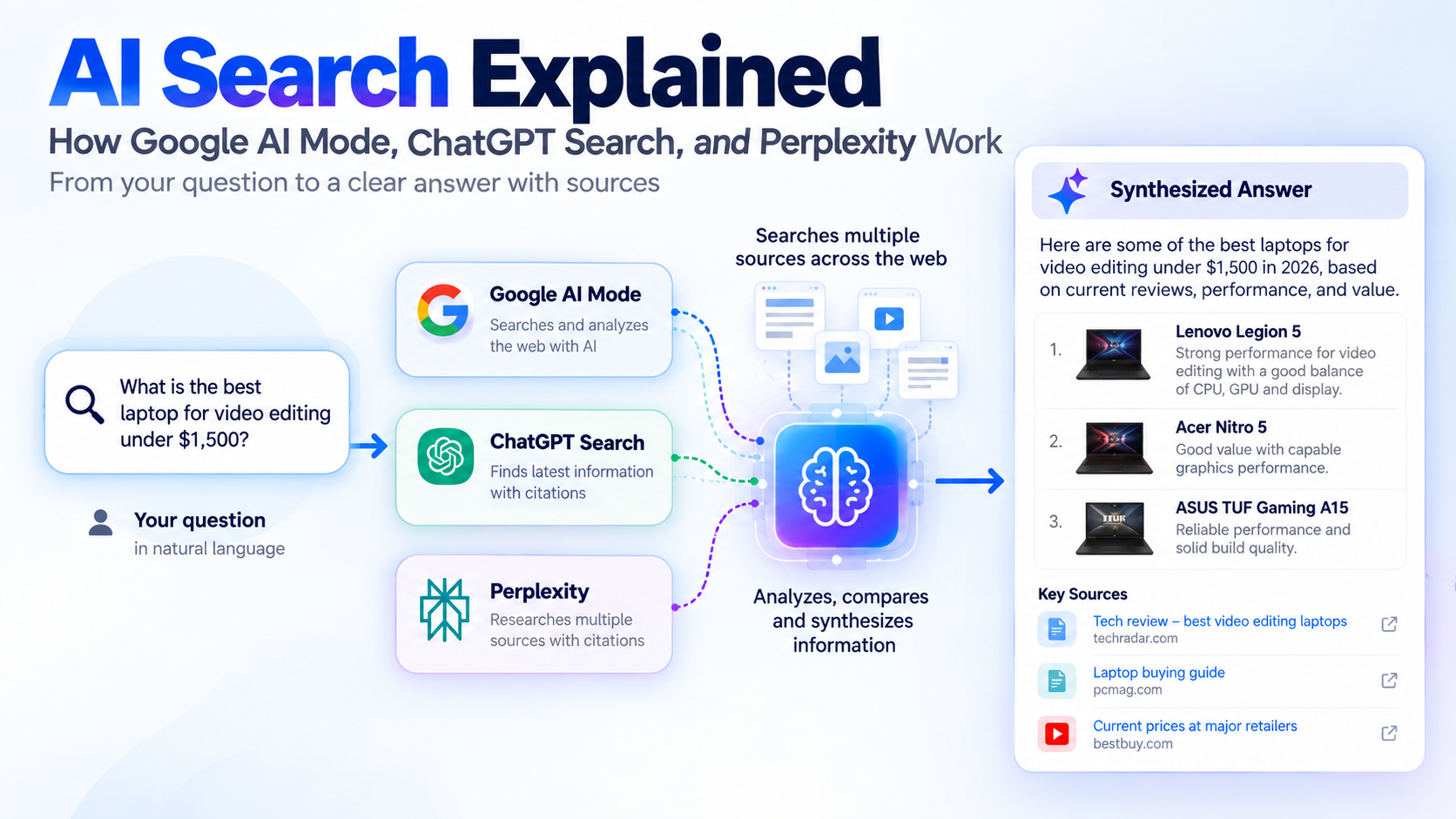
Search engines have traditionally worked by matching a person's query with pages available on the web, ranking those pages, and presenting links for the user to explore.
AI Search changes that experience. Instead of only returning a list of links, an AI-powered search system can interpret a complex question, search for information, combine information from multiple sources, and produce a conversational answer with links that let the user investigate further.
That does not mean every AI search system works in exactly the same way. Google AI Mode, ChatGPT Search, and Perplexity use different products and interfaces, but they share an important idea: search can become a process of researching and synthesizing information rather than simply matching keywords.
What Is AI Search?
AI Search is a search experience that uses artificial intelligence to understand a user's question and help produce an answer from information found on the web.
A traditional search might take a query such as:
"What is the best laptop for video editing?"
and return a page of ranked results.
An AI Search system can interpret the question as a more complicated research task. It may need to consider current laptop models, processors, graphics performance, memory, storage, display quality, prices, reviews, and other factors before producing an answer.
The important difference is that the user may receive a synthesized response instead of having to open several pages and combine the information manually.
AI Search does not eliminate the underlying web. The information still has to come from somewhere, and the quality of the sources can affect the quality of the resulting answer.
How Is AI Search Different From Traditional Search?
Traditional search and AI Search can overlap, but they emphasize different parts of the search process.
Traditional search generally works like this:
Question → search query → ranked results → user opens pages → user evaluates information
An AI Search experience can add several steps:
Question → understand intent → search for relevant information → combine findings → generate an answer → provide sources and links
This makes AI Search particularly useful for questions that would normally require several searches.
For example, someone researching a trip might ask:
"What should I know before visiting Japan for the first time in spring?"
That question contains several possible research areas, including weather, transportation, local customs, costs, popular destinations, and travel requirements.
An AI Search system can help organize those areas into one response while still giving the reader links to investigate the underlying information.
However, the user should not assume that a generated answer is automatically correct. Important information should still be checked against the original sources.
How Does AI Search Work?
Although implementations differ, an AI Search workflow can be understood as several stages.
1. Understanding the question
The system first interprets what the user is actually asking.
This can involve identifying the subject, intent, constraints, and relationships between different parts of the question.
A conversational question such as:
"Which is better for a small business, an eSIM or a physical SIM?"
contains more than a simple keyword. The system needs to understand that the user is asking for a comparison and that factors such as compatibility, activation, convenience, coverage, and cost may matter.
2. Breaking complex questions into smaller searches
Some AI Search systems can divide a complicated question into multiple subtopics.
Google calls one version of this approach "query fan-out." Google says AI Mode can divide a question into subtopics and search for each one simultaneously across multiple data sources.
This allows a complex question to be investigated from several directions rather than relying on one search query.
3. Retrieving information
The system then retrieves information from available sources.
Depending on the product and search mode, those sources can include websites, articles, documentation, research material, and other information available through the search system.
This is one reason source quality matters. If the available information is incomplete, outdated, misleading, or poorly understood, the final answer can also be affected.
4. Synthesizing the information
The retrieved information is then processed and combined into a response.
Instead of simply showing ten separate pages, an AI Search system can summarize relevant information from several sources into a more readable explanation.
This is where AI Search becomes different from a conventional results page.
The user is not only being shown where information exists. The system is attempting to help explain what the information means.
5. Providing sources and links
Good AI Search experiences provide ways to investigate the underlying information.
Google AI Mode provides links to supporting web content. ChatGPT Search can provide citations and links to sources. Perplexity emphasizes cited answers and direct links to original sources.
Those links are important because they allow users to move from an AI-generated summary to the underlying material.
How Google AI Mode Works
Google AI Mode is Google's AI-powered search experience.
Google says AI Mode is designed for questions that may previously have required multiple searches. It can handle follow-up questions and uses query fan-out to divide complex questions into subtopics and search for them simultaneously.
For example, instead of treating:
"Compare the battery life, camera, processor, and price of these three phones"
as one simple query, the system can investigate several aspects of the comparison before bringing the information together.
Google also emphasizes that AI Mode is connected to the broader Google Search system and provides links that allow users to explore the web.
An important limitation is that Google says AI Mode does not always get things right. It can sometimes misinterpret web content or miss context.
That means an AI-generated answer should not replace checking important information against the sources behind it.
How ChatGPT Search Works
ChatGPT can search the web when current information is needed.
OpenAI explains that ChatGPT Search can search the web and provide citations and links to relevant sources.
The experience is conversational, which means a user can start with one question and then ask follow-up questions without having to completely restate the original topic.
For example:
"What are the newest Android phones?"
could be followed by:
"Which ones have the best battery life?"
and then:
"Compare those two for photography."
This conversational approach can make research easier because the search process can continue from the context of the previous question.
OpenAI also recommends reviewing cited sources because search results and citations can sometimes be incomplete, outdated, or incorrect.
How Perplexity Works
Perplexity describes itself as an AI answer engine that searches the web and produces cited answers.
Its Pro Search documentation explains that the system can conduct multiple searches, draw from different sources, synthesize the information, and provide direct links to the sources used.
This makes source visibility a central part of the experience.
Perplexity is particularly oriented toward research-style questions where the user wants an answer but also wants to see where the information came from.
Like other AI Search systems, however, users should still verify important information by checking the cited sources.
AI Search vs. Traditional Search
Neither approach is useful for every situation.
Traditional search can be very effective when you already know what you are looking for.
For example:
"Microsoft passkey support"
or
"Apple eSIM setup"
may lead directly to an official support page.
AI Search can be more useful when the question is complicated, involves comparisons, or requires information from several sources.
For example:
"How does eSIM compare with a physical SIM when traveling internationally?"
requires more explanation than a simple navigation query.
A practical approach is to use both.
Use traditional search when you need a particular website, official documentation, a specific product page, or a known source.
Use AI Search when you need help exploring a complicated question, comparing information, or understanding a topic before investigating the original sources.
Why AI Search Can Still Be Wrong
AI Search can make research faster, but it does not make errors impossible.
An AI-generated answer can be affected by:
- Incorrect or incomplete information on the web
- Outdated information
- Misunderstanding the user's question
- Missing context
- Poor-quality sources
- Incorrectly combining information from different sources
- Errors introduced during the generation of the final response
The answer can also sound confident even when one of its assumptions is wrong.
This is why citations and source links matter.
If an AI Search system says that a product supports a particular feature, the safest approach is to check the manufacturer's documentation when that detail matters.
For health, financial, legal, security, or other high-impact information, users should be especially careful about relying on an AI-generated summary alone.
How to Check an AI Search Answer
You do not need to distrust every AI-generated answer.
Instead, learn to verify the parts that matter.
Check the original source
If an answer provides a link, open it and read the relevant section yourself.
Prefer primary sources
For product specifications, check the manufacturer's documentation.
For software features, check the developer's or vendor's documentation.
For government rules, check the relevant government website.
For scientific claims, look for the original research or reputable scientific sources.
Check dates
Information can change quickly.
A product feature, price, policy, software capability, or service availability may have changed since an article was published.
Compare important claims
If something matters, check more than one reliable source.
Google itself recommends checking important information in more than one place when using AI Mode.
Why Sources Still Matter in AI Search
It is easy to assume that AI Search makes websites less important because the user can receive an answer without opening a page.
The reality is more complicated.
AI Search still needs information to retrieve, evaluate, and summarize.
Google has continued adding ways for users to discover original websites, articles, and other sources within its AI Search experiences.
ChatGPT Search provides citations and links to sources.
Perplexity also emphasizes direct source links and citations.
This means the web remains an important part of AI Search.
The interface may change from a list of blue links to a conversational answer, but trustworthy information still needs an underlying source.
What AI Search Means for the Web
AI Search is changing how people discover information online.
Instead of every search ending with a list of pages, some searches can now begin with an AI-generated explanation and then lead the user toward deeper sources.
That changes the role of search.
The user may spend less time figuring out which pages to open first and more time evaluating the information that has already been collected.
For publishers, this also makes useful original content important.
A page that simply repeats information available everywhere may have little additional value.
A page that provides original explanations, useful examples, reliable references, clear organization, and information that helps the reader understand a subject can remain valuable even as search interfaces evolve.
Should You Use AI Search or Traditional Search?
The answer depends on what you are trying to accomplish.
Use traditional search when you need:
- A specific website
- Official documentation
- A product page
- A particular article
- A known source
AI Search can be useful when you need:
- An explanation of a complicated subject
- A comparison
- A multi-step research starting point
- Information from several sources
- Follow-up questions about the same subject
For important information, the best approach is often to combine both.
Start with AI Search to understand the topic or identify useful sources.
Then open the original sources and verify the claims that matter.
The Bottom Line
AI Search is not simply a new name for a search engine.
It changes part of the search process by allowing systems to understand more complex questions, retrieve information from multiple sources, synthesize that information, and present the result conversationally.
Google AI Mode uses techniques such as query fan-out to investigate different parts of a question. ChatGPT Search can search the web and provide cited sources. Perplexity combines web searches and AI synthesis with citations.
But the underlying principle remains important:
AI-generated answers are not the same thing as verified information.
The best way to use AI Search is to treat it as a research and discovery tool while continuing to check important claims against reliable original sources.
As AI Search continues to evolve, the ability to find information may become easier. The ability to recognize trustworthy information will remain just as important.
Sources
- Get AI-powered responses with AI Mode in Google Search — Google
- Searching the web with ChatGPT — OpenAI
- What is Pro Search? — Perplexity
- How AI Mode and AI Overviews help you explore the web — Google